Accounting export: Excel and CSV ready for your accountant
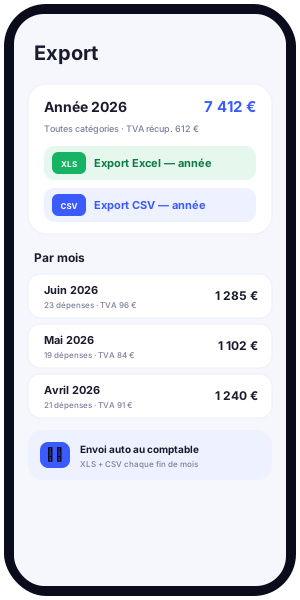
Professional expense management does not stop at recording a spend. Sooner or later, you have to hand this data over to your accountant, your chartered accountant or your payroll department. This is exactly the moment when a poorly maintained Excel spreadsheet shows its limits: forgotten columns, broken formulas, risky copy-paste, lost receipts. Kwevio is designed to clear this hurdle painlessly. The free professional expense management application generates a clean accounting export, in two universal formats: an Excel expense report (XLSX) and a flat CSV export. You get files your accountant can use straight away, with recoverable VAT clearly readable and receipts attached.
In this article, we detail how Kwevio's accounting export works: the Excel format with its annual summary and twelve monthly tabs, the CSV format and its detailed columns, the export scope by month, by year and by category, the place of VAT, receipts attached as an archive, automatic monthly sending to the accountant, compatibility with accounting software, and finally best practices for monthly closing. Kwevio is free, available on Android, iOS and as an installable lightweight web version (PWA), multilingual and multi-country. It was created by FACEM WEB (Arras) to replace an Excel spreadsheet that had become too fragile.

Why the accounting export really matters
An expense report only has value if it can be transmitted, checked and recorded. Between the moment you incur a spend and the moment it is entered into the company's accounts, there is a transmission chain that, all too often, breaks. The employee re-enters their expenses in a spreadsheet, the accountant copies them again into their software, and each handling step introduces errors. Kwevio's accounting export removes these breaks by producing a faithful, complete and standardised document.
The first benefit is simple transmission to the accountant or chartered accountant. Instead of sending a cobbled-together spreadsheet or a jumble of photos, you send a structured file that your contact recognises immediately. The second benefit is universal compatibility: Excel and CSV formats open everywhere, on any workstation, with no proprietary software. The third benefit is the end of copy-paste: data leaves the application exactly as it was entered, with no manual rewriting. The fourth is traceability: each line carries its date, its category, its amount and its receipt. The fifth, finally, is readable recoverable VAT, calculated and presented clearly so that nothing is lost.
For a small business, a freelancer or a sales team on the road, these benefits translate into time saved and peace of mind. Monthly closing stops being a chore and becomes a simple export.
The Excel format: an annual summary and twelve monthly tabs
Kwevio's Excel format (XLSX) faithfully reproduces the structure of an expense workbook as an accountant expects it. The workbook opens on an annual summary tab that aggregates all your spending across the year, then offers twelve monthly tabs, one per month. This layout is familiar, readable and directly understandable by anyone used to handling an Excel expense report.
The annual summary
The first tab offers an overview: totals by month, totals by category, overall gross amount, VAT share, net base. It is the dashboard of the year. Your accountant immediately finds the big aggregates there and can check consistency before drilling into the detail. For you, it is also a steering tool: you see at a glance where your professional expenses go and how they evolve month after month.
The twelve monthly tabs
Each month has its own tab. There you find the detailed list of the month's expenses, line by line, with the date, the category, the label, the distance where relevant, the gross amount, the VAT rate, the VAT amount, the net amount, the number of guests for meals, and the receipt indication. Monthly totals are calculated at the bottom of the tab. This granularity allows fine checking: if a line raises a question, you find it in seconds in the right tab.
Why keep the Excel format
Many accounting firms and small businesses still think in workbooks. The Excel format speaks their language. It lets them sort, filter, add a comment column or quickly cross-check a total without any specialised tool. It is also a robust archiving format: a workbook opened in ten years will still be readable. By reproducing the layout of a classic Excel expense report, Kwevio spares your accountant any learning curve. They open the file and immediately find their bearings, which reduces questions and speeds up processing.
This Excel format is ideal when your accountant still works heavily in a spreadsheet, or when you want to keep a readable and printable archive of your expenses. It reproduces exactly the workbook many people kept by hand, but without the risk of error and without the chore of data entry.
The CSV format: detailed columns and maximum compatibility
Alongside the Excel format, Kwevio offers a CSV export, that is to say a flat file where each expense occupies a single line. This format is not meant to be read directly by a human: it is designed to be imported into accounting software. It is the interoperability format par excellence.
The columns of the CSV file
Each line of the CSV describes an expense with its detailed columns:
- Date of the expense;
- Category (meals, accommodation, transport, fuel, tolls, supplies, etc.);
- Label describing the nature of the expense;
- Distance travelled, for mileage expenses;
- Gross amount, the amount actually paid;
- VAT rate applied;
- VAT amount corresponding;
- Net amount (excluding tax);
- Guests, the number of people for business meals;
- Receipt, the reference to the associated attachment.
Another strength of CSV is its lightness. A text file of a few kilobytes holds hundreds of professional expense lines, travels easily by email and is processed instantly, even on a modest workstation. Where a bulky Excel workbook can slow down, the CSV stays nimble. For a team that produces a lot of spending, this leanness counts.
Compatibility with any accounting software
CSV is the common language of tabular data. Any accounting software, any spreadsheet (Excel, LibreOffice Calc, Google Sheets) and most management tools know how to import a CSV file. Your chartered accountant can therefore load your professional expenses into their own working environment, respecting their chart of accounts, without retyping a single line. Note that Kwevio does not connect directly to any named accounting software: the bridge is made via the CSV (or Excel) file, which guarantees total independence and lasting compatibility.
Exporting by month, by year or by category
Kwevio's accounting export adapts to your transmission needs through three complementary scopes.
Export by month
The monthly export is the natural rhythm of the expense report. At the end of each month, you generate the file for the elapsed month and you send it. It is the most common scope, perfectly suited to regular closing and to monthly VAT.
Export by year
The annual export produces the complete workbook, with its summary and its twelve tabs. It serves for the balance sheet, the annual declaration or archiving. It is the complete snapshot of your professional expenses over the financial year.
Export by category
The category export isolates one type of spend: for example only mileage expenses, only meals, or only accommodation. This filtering is valuable for analysing a spending line, justifying a specific reimbursement or answering a targeted request from your accountant. You get exactly the subset you need, with no noise.
VAT in the export: readable recoverable VAT
VAT is often the great forgotten item of hand-kept expense reports. Yet well-tracked VAT is recovered cash. Kwevio includes in every export the three amounts that matter: the net amount (excluding tax), the VAT amount and the gross amount. The VAT rate applied is shown for each line.
This presentation makes recoverable VAT immediately readable for your accountant. They know, line by line, what share of VAT can be deducted, without having to recalculate anything. For expenses whose VAT is not recoverable (certain fuels, certain entertainment costs depending on the rules in force), the tracking remains transparent: the amount appears, and it is your accountant who applies the appropriate treatment. What matters is that the raw data is complete and reliable.
One special case deserves attention: mileage expenses. The exported mileage amount reflects the scale applied (the scale in force, according to the vehicle's power rating and the distance), while other expenses are exported at their actual amount. This distinction is essential for correct accounting treatment, and Kwevio respects it automatically.
This rigour on VAT has a direct effect on cash flow. Over a year, dozens of small overlooked recoverable VAT amounts can add up to a meaningful sum. By making every amount visible and usable, Kwevio's export helps you stop leaving that money on the table. Your accountant has everything they need to post the deductible VAT in the right place, without estimating or reconstructing anything.
Receipts attached to the export
An expense without a receipt is a fragile expense. In the event of an audit, the absence of a supporting document can call into question the deductibility of a charge or the recovery of VAT. This is why Kwevio lets you attach receipts (photos or PDFs) to the export, in the form of an archive.
In practice, when you export your expenses, you can include an archive containing all the supporting documents linked to the period's spending. Each line of the export refers to its receipt, which makes it possible to link an amount to its proof without ambiguity. Your accountant thus receives a complete file: structured data on one side, documents on the other, the whole thing consistent. No more back-and-forth to ask for a missing receipt; everything goes out in a single transmission.
Automatic sending to the accountant
For those who want to fully automate transmission, Kwevio offers an automatic monthly sending option. Each month, the application can generate the Excel (XLS) and CSV files for the elapsed period and send them by email directly to your accountant.
This mechanism turns monthly closing into an invisible operation. You no longer have to think about exporting or writing an email: on the agreed date, your accountant automatically receives the month's summary, in both formats, ready to be integrated. For a freelancer juggling assignments, or for a team that does not want to weigh down its processes, this automation guarantees that nothing is forgotten and that transmission always happens on time. Sending remains configurable: you choose the recipient and the timing.
Automatic sending fits a logic of peace of mind. You configure the recipient and the frequency once, then forget about it. It also reduces human friction: no more chasing from an accountant waiting for the expenses, no more reimbursement delays for lack of transmission. Regularity becomes the norm, and the relationship with your chartered accountant becomes calmer.
Compatibility with accounting software
Kwevio's strength when it comes to export rests on a simple design choice: relying on open formats rather than proprietary connectors. The Excel file and the CSV file are the two most widespread standards for exchanging accounting data.
In concrete terms, this means your professional expenses can feed practically any environment: a spreadsheet (Excel, LibreOffice), accounting software, a payroll or invoicing management tool, as long as it accepts CSV import or the reading of an Excel workbook. This file-based approach guarantees lasting compatibility: even if your accountant changes tools, your exports remain usable. Kwevio claims no direct integration with any named software, because true interoperability goes through these universal formats, which depend on no vendor.
For your chartered accountant, this neutrality is reassuring: they keep their method, their chart of accounts and their habits, and simply import a clean file. For you, it is the assurance of never being a prisoner of a format or a supplier.
Best practices for monthly closing
A good export starts with good bookkeeping throughout the month. Here are a few best practices so that your monthly closing is smooth and reliable.
- Capture as you go. Photograph each receipt at the time of the expense rather than reconstructing everything at the end of the month. Immediate capture avoids omissions and memory errors.
- Check the categories. A well-chosen category makes the accountant's work easier and supports analysis by line. Get into the habit of classifying each expense correctly.
- Review the VAT. Before the export, glance at the VAT rates and amounts to spot any obvious anomaly. Better to correct it in the application than to have the file sent back.
- Attach the receipts. Make sure every significant expense has its document. A complete archive avoids follow-ups.
- Export on a fixed date. Choose a closing day (for example the 1st of the following month) and stick to it. Automatic monthly sending can handle it for you.
- Keep your exports. Archive the Excel and CSV files for each month. In case of a question or an audit, you have an immediate record.
These simple habits turn closing into a formality. With Kwevio, most of the work is already done by the time you press the export button.
Conclusion
The accounting export is the moment of truth for an expense report: it is where captured data becomes transmitted, verifiable and recorded data. Kwevio approaches this step with two complementary and universal formats. The Excel format reproduces the familiar workbook, with its annual summary and its twelve monthly tabs. The CSV format opens the door to all accounting software thanks to its detailed columns and its maximum compatibility. Between the two, recoverable VAT stays readable, receipts travel in an archive, and automatic monthly sending frees up your closing.
You thus replace the fragile spreadsheet and risky copy-paste with a clean, traceable and compatible transmission. Your accountant receives files they recognise, you save time, and your VAT is no longer lost. Kwevio is free, multilingual and multi-country, available on Android, iOS and as an installable web version. Ready to simplify your exports to your chartered accountant? Discover Kwevio and start for free.